


Streamline employee management with accurate punch data.
Replace messy paper timesheets, fuzzy “I think I got in around 8” answers, and end-of-month payroll chaos.
Accurate Time Tracking
Employees punch in and out to log exact work hours. Every timestamp is captured down to the second — no rounding, no guessing.
Better Workforce Management
Use punch-in and out data to optimize scheduling and productivity. Spot patterns, fix bottlenecks, staff smarter shifts.
Every employee. Every hour. One screen.
See who’s clocked in and who’s clocked out — in real time. Pull reports for any date range and hand your bookkeeper clean, accurate numbers every payroll cycle.
Live shift status
Know instantly who’s clocked in and who’s clocked out for the day.
Weekly & monthly totals
Roll-up reports per employee, ready to export for payroll.
Export-ready reports
Download attendance summaries in the format your accountant loves.

Every job, every stage — on one board
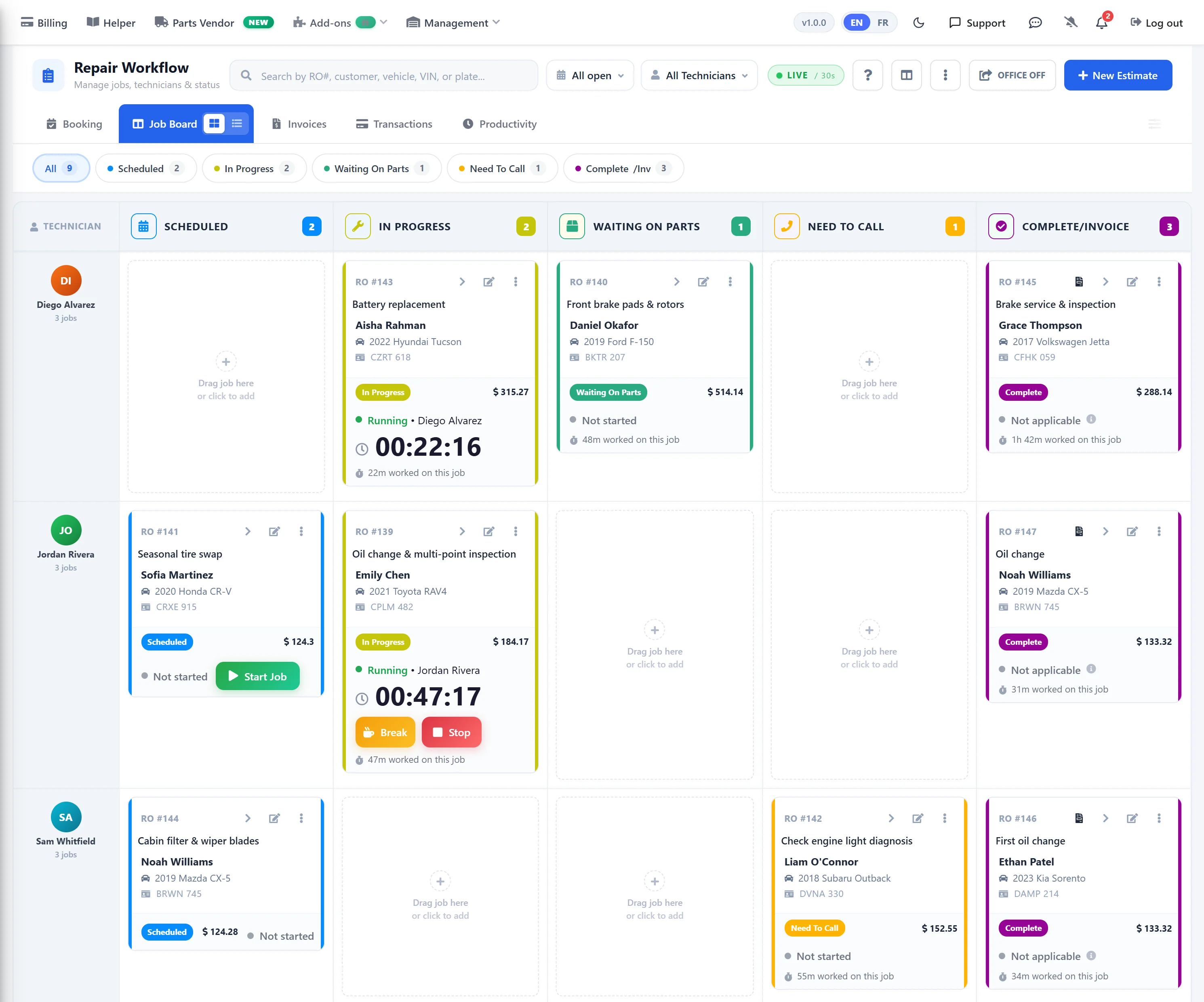
A live Kanban board that shows exactly where every repair sits: scheduled, in progress, waiting on parts, need to call, complete and ready to invoice. Techs start and stop their own jobs; the board updates for the whole shop in real time.
- Live status columns — Scheduled, In Progress, Waiting On Parts, Need To Call, Complete/Invoice.
- Tech-controlled timers — Start / Break / Stop right from the job card.
- Instant handoff — drag between columns; nobody wonders what’s next.
- Office board below — jobs waiting on payment, month-end reviews, and completed-not-closed all in one view.
Worked hours vs. billed hours — the real efficiency number
Stop guessing which techs are pulling their weight. The productivity report shows clocked-in hours next to billed hours — per tech, per job, per day — with an efficiency percentage on every line.
- Efficiency % per job — billed hours ÷ clocked hours, colour-coded per row.
- Grand total by tech — roll up the day, the week, or the month.
- Pay techs on what they billed — export the report straight to payroll.
- Spot the bottleneck — a run of low-efficiency scores on the same job type tells you where the training gap is.

Real numbers = a more profitable shop
Every shop measures revenue. The ones that grow measure worked-vs-billed hours too — because that’s where the profit hides.
Every minute accounted for
Clocked hours are captured automatically per job — no more sticky notes, no more “I think it took me about two hours.”
Efficiency, not guesses
See who’s beating book time and who’s bleeding it — on the same screen, updated in real time.
Kanban clarity
Every tech, every advisor, every owner sees the same board. Nobody has to ask “where’s that Civic at?”
Fair, transparent pay
Pay technicians on billed hours with a defensible record. No dispute about time, no dispute about pay.
Happier technicians
Techs beating book time love seeing it on the board. Techs falling behind get the coaching they need to catch up.
Straight into payroll
Export billed hours as a CSV or push straight to your QuickBooks / Sage payroll run at the end of the week.
Give your shop real visibility
Live workflow board. Per-tech productivity report. Every hour, every job, every dollar — on one screen. Free for 10 days.